0+
AI Prompts Launched
Contextual AI prompts drove 941 interactions across 373 students in Summer 2025 REAL CHEM.
Designing AI Activation Points for Student Learning Support — contextual prompting that surfaces DOT at key learning moments.
Overview
This 7-month capstone project was a collaboration with the Open Learning Initiative (OLI), an open-source platform that applies learning science and technology to improve student outcomes.
Within OLI's REAL CHEM course, our goal was to make AI support more visible, timely, and useful — helping students get help at the moment it matters, without interrupting their learning flow. Although DOT (Digital Online Tutor) - the platform’s AI-powered tutor - was already embedded throughout the course, students often overlooked it or encountered it at the wrong moment.
As the team's Product Designer and Prompt Engineer, I designed DOT AI Activation Points — a contextual prompting system that surfaces DOT at key learning moments. Validated with 373 REAL CHEM 1 students in Summer 2025, the system raised DOT interaction from 44% to 80.4% and scored ~85 on the SUS (System Usability Scale).
Outcome
Problem
Students often needed help but weren't seeking it at the right moment — leading to low engagement with support overall. If support became easier to access in the learning moment, engagement might improve.
We considered two directions, then moved forward with DOT as an in-course AI tutor — it could provide contextual support directly inside the learning flow. Since it already knew what page the student was on, students could ask page-specific questions without reconstructing context somewhere else.
Plan A ❌
Traditional Support
Q&A · quizzes · instruction
Plan B ✅
DOT: In-course AI Tutor
Contextual support within the learning flow
However, When we tested this with 15 students, we found that many still overlooked it because it remained a passive icon in the bottom-right corner, and students still had to initiate the interaction themselves.
Design Solution


DOT AI Activation Points
A system that triggers DOT at key learning moments, enabling timely, contextual support for students.
🔴
Activity Level
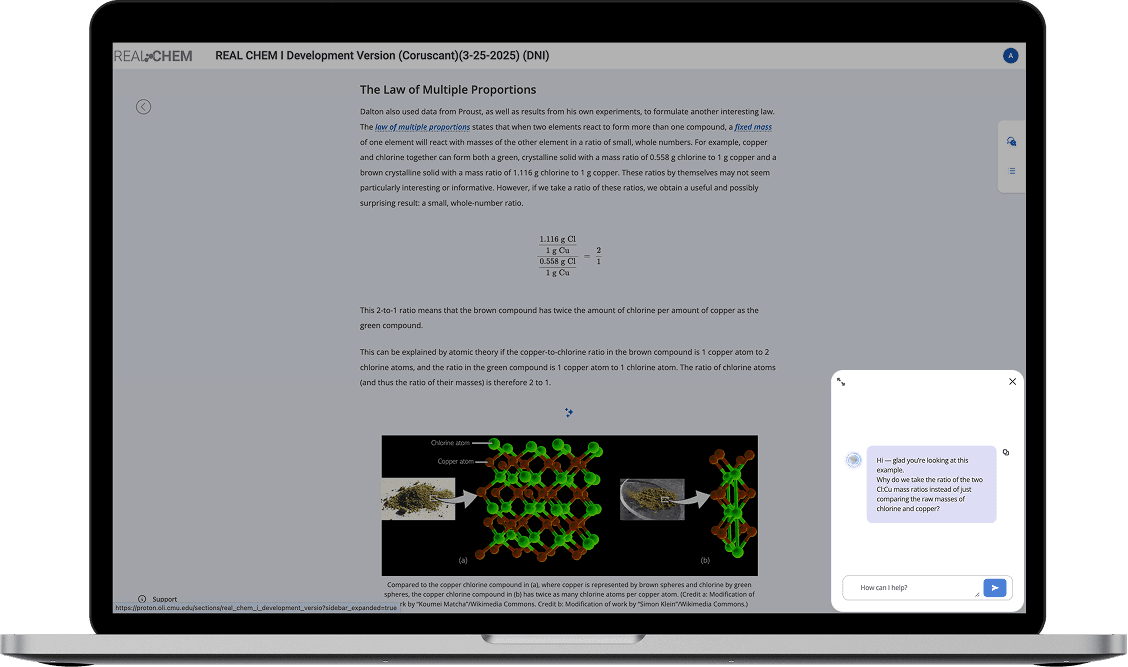
DOT activates at key activity moments — incorrect answers or hint requests — where students are most likely stuck.
🟢
Paragraph Level
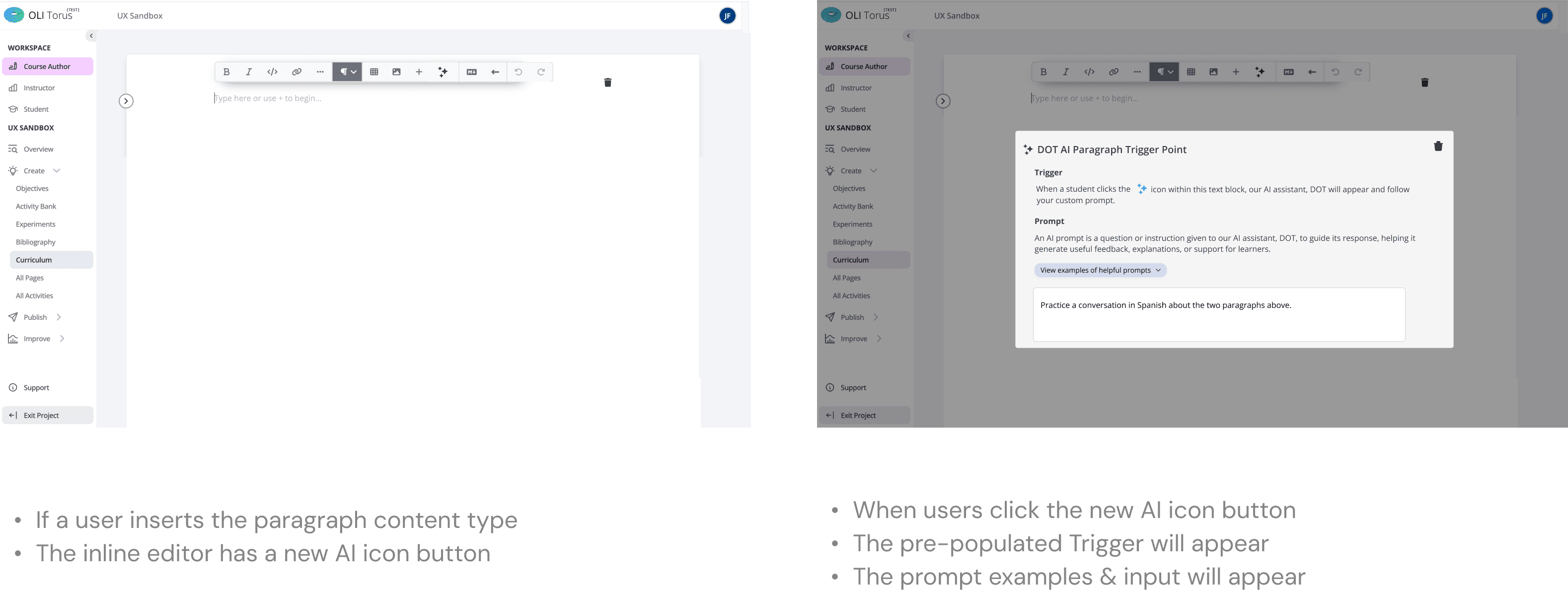
DOT appears below a specific paragraph when the student clicks its AI icon — targeted support on a single concept.
🔵
Page Level
DOT activates on a student's first visit to a page, orienting them before they begin.
3 Levels of Activation
🔵 Page Level Activation
DOT activates when a student visits the page for the first time
🔴 Activity Level Activation
DOT activates when a student reaches a key activity moment, such as answering incorrectly or requesting a hint

🟢 Paragraph Level Activation
DOT activates when a student clicks the AI icon next to a specific paragraph

DOT Activated
Behind the iteration
How does DOT Activation Point work?
How does an author add prompt?
🔵 Authoring Page Level Trigger

🔴 Authoring Activity Level Trigger
Prompt logic
We grounded prompt design in real learning difficulties rather than generic AI writing. We worked with a chemistry expert to identify where students were likely to get stuck, then translated those sticking points into targeted activation logic and prompt behavior.
That meant prompts weren’t one-size-fits-all. Each one was tied to a specific learning challenge and shaped by learning science principles, like guiding reasoning, surfacing misconceptions, or prompting reflection.
01
Identified real student sticking points with a chemistry expert
02
Translated each learning difficulty into a targeted activation and prompt
03
Shaped prompt behavior with learning science principles
How do we define an effective prompt?

Design Component System

Retrospective
If we had more time, there are two things I’d want to test next. First, I’d want to understand which activation moments drive the most meaningful engagement, not just the most clicks. Second, I’d want to compare prompts more deeply in terms of trust and reasoning quality.
The biggest takeaway for me is that this project taught me to think about AI as behavior design, not just answer generation. I turned AI from a passive feature into a workflow, and built a more scalable intervention model through timing, prompts, and UI.
View More Projects